In today’s fast-paced world, the way we manage our finances is continually evolving. Among these developments, one that stands out is the advent of cardless ATMs. This innovative service has not only revolutionized banking, but also added an extra layer of security and convenience to our daily transactions. But exactly how does one navigate this system? If you’ve found yourself asking, “How to use cardless ATM?” then this article of Trendbbq.com is for you.
Table of Contents,
1. What Is a Cardless ATM?
A cardless ATM, also known as a contactless ATM, provides a convenient alternative for consumers to access their funds and perform transactions without using their physical debit card. Instead of swiping a card, these ATMs use various technologies, often integrated with a mobile app on your smartphone, to verify your account and authorize transactions. With a cardless ATM, you enjoy the same functionality as a regular ATM, including cash withdrawals, balance inquiries, and other typical ATM transactions.
Major traditional banks like Wells Fargo, Chase, and Bank of America have already implemented ATMs with cardless access. However, it’s worth noting that non-traditional financial institutions, such as credit unions and online banks, are also likely to offer this service to their customers for added convenience and ease of use.
2. How do cardless ATMs work?
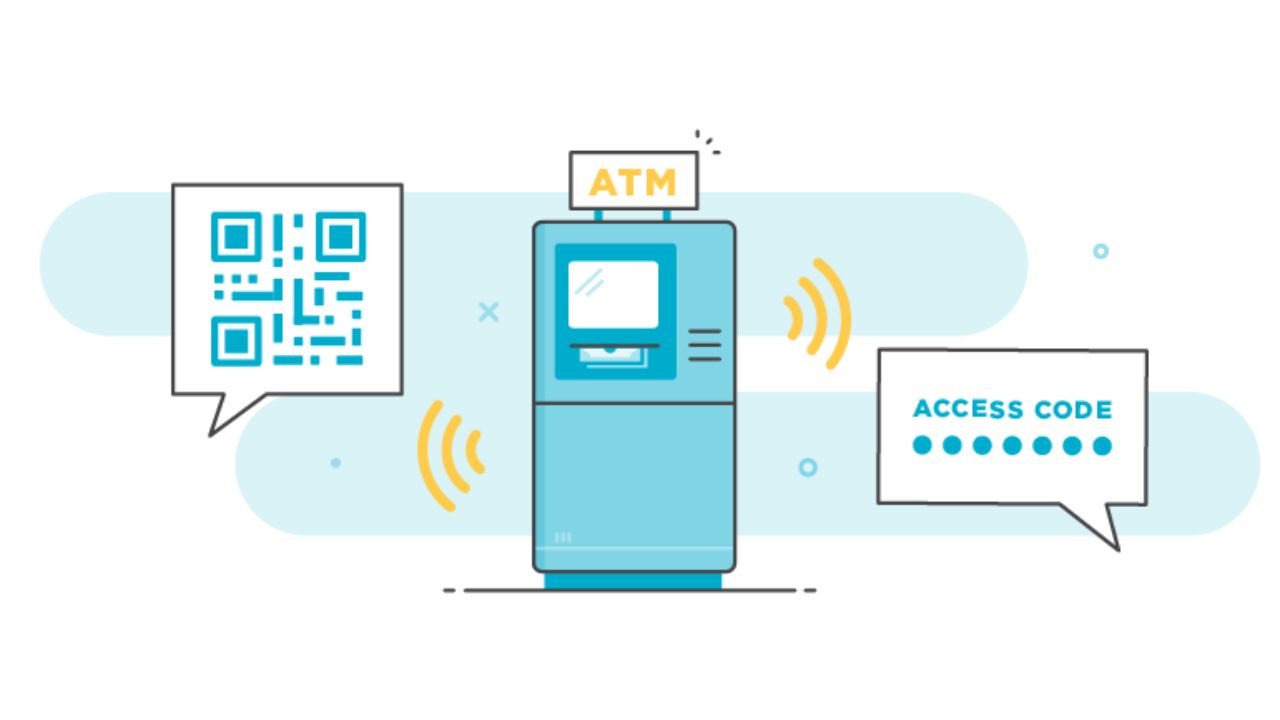
Cardless ATMs employ your smartphone to validate your identity and sanction the dispensation of cash. There are two prevalent mechanisms in use:
- Near-field Communication (NFC): This is the most widespread method employed by cardless ATMs. Upon tapping your phone to the ATM, the embedded NFC chip in your device dispatches a signal that confirms your identity, thus enabling you to retrieve your cash.
- QR Code: Certain ATMs are equipped with a QR code that you can scan with your mobile device. Scanning this code will prompt a link in your bank’s mobile application, where you can validate the cash withdrawal and subsequently collect your money.
3. How to use cardless ATM
Follow these instructions to navigate a cardless ATM:
- Launch the mobile application of your banking institution.
- Opt for the “Cardless ATM” feature.
- Input the sum you wish to withdraw.
- Press the “Withdraw” command.
- If employing Near Field Communication (NFC), gently tap your mobile device against the ATM.
- If utilizing a QR code, scan the provided code using your smartphone.
- Input your Personal Identification Number (PIN).
- Retrieve your withdrawn funds.
Cardless ATMs serve as a secure and expedient method for cash withdrawals. They come in particularly handy should you misplace your debit or credit card, or opt for traveling without the extra bulk.
4. Advantages of using a cardless ATM
Using a cardless ATM offers several benefits that enhance convenience, security, and reduce physical contact:
- Convenience: With a cardless ATM, you no longer need to carry your physical debit card to withdraw cash. Instead, you can simply use your smartphone to initiate the transaction, making it easier and more efficient.
- Enhanced Security: Cardless ATM access can provide an added layer of security, reducing the risk of falling victim to card skimmers or other forms of card-related fraud. By using your phone for transactions, you decrease the chances of your card’s information being compromised.
- Reduced Physical Contact: While it may not entirely eliminate contact, the cardless option requires less physical interaction with the ATM. You can complete the withdrawal process without the need to insert or swipe your card, which can be especially beneficial during times when minimizing contact is important.
5. Disadvantages of using a cardless ATM
- It’s important to note that cardless ATM functionality is not available at all ATMs. Some financial institutions offer this feature exclusively to their own customers, limiting access for others.
- Using a cardless ATM involves storing some of your banking information on your phone, either in a digital wallet or a dedicated mobile app. While this provides convenience, it also presents a security risk. If your phone gets lost or stolen, and you haven’t properly secured it, there’s a potential risk of unauthorized access to your account by someone else.
6. FAQs
Is it safe to use a cardless ATM?
Yes, cardless ATMs are designed with security measures to protect your financial information. The authentication process involves secure technology, and transactions typically require additional verification, such as a PIN or biometric authentication. However, it’s essential to keep your phone and mobile banking app protected with strong passwords or biometric security to prevent unauthorized access.
Which banks offer cardless ATM services?
Many major banks and financial institutions now offer cardless ATM services to their customers. Some well-known banks, such as Wells Fargo, Chase, and Bank of America, have already implemented this feature. Additionally, certain credit unions and online banks may also provide cardless ATM options.
Can I withdraw cash from any ATM using the cardless feature?
Not all ATMs support cardless withdrawals. The availability of cardless ATM services may vary depending on the ATM’s location and the bank or financial institution that operates it. It’s essential to check with your bank or use their mobile app to find ATMs that offer cardless services.
Are there transaction limits for cardless ATM withdrawals?
Yes, like regular ATM transactions, cardless ATM withdrawals may have daily or per-transaction limits. The specific limits depend on your bank’s policies and may vary from one financial institution to another. Be sure to check your bank’s terms and conditions to understand the limits for cardless ATM transactions.





learnandapplyquick.shop – Insightful hub, encourages immediate practice and fast skill development.
forwardthinkhub.click – Insightful content, encourages strategic planning and anticipating future opportunities.
Lifestyle Selection Hub – Smooth browsing with fast page loads and intuitive category layout.
Learn And Improve Hub – Provides strategies to absorb knowledge and enhance efficiency quickly.
worldstore.shop – Wide selection, interface is simple and browsing is fast.
learn and optimize processes – The content feels practical and centers on improving workflows thoughtfully.
shopdaily.shop – User-friendly for everyday items, navigation is smooth and convenient.
Progress Made Simple – Promotes straightforward thinking to maintain reliable forward motion.
idea progress platform – It clearly suggests development while remaining user oriented.
heritagestylehub.click – Beautifully curated items, site blends contemporary design with classic charm seamlessly.
Focused Growth Path – Provides practical guidance for planning and achieving meaningful growth.
discover new directions now – Inspires fresh thinking and encourages exploring innovative paths for growth.
actstepshub.shop – Motivational content, guides users to take immediate action and reach goals faster.
newideashub.click – Motivational content, encourages users to explore fresh ideas and innovative strategies.
Optimize Fast Hub – Highlights actionable methods for rapid improvement and learning.
a href=”https://discoverinnovativethinking.click/” />Innovative Thought Flow – Promotes continuous learning through fresh and creative perspectives.
curatedcorner.click – Thoughtful collection, navigating the site is easy and discovering products is effortless.
Plan And Begin – Offers guidance for initiating tasks in a structured and intentional way.
claritystepshub.click – Practical guidance, helps users define goals and outline clear action plans.
quickgrowthhub.shop – Practical hub, guides users to expand knowledge and develop skills effectively and quickly.