
Are you curious about how to rename apps on iPhone? It’s a frequent question we hear, particularly from users who like to keep their home screen organized and personalized. While it might seem complicated at first, renaming apps on your iPhone is actually a straightforward process once you understand the steps. This article, Trendbbq.com will guide you through that process with the latest information available.
1. Why Renaming iPhone Apps is Useful?
Many iPhone users often wonder why they might need to learn how to rename apps on iPhone. Well, the answer lies in personalization and organization. Renaming apps allows you to label them according to your preference, which can significantly enhance your user experience.
Enhance Personalization
Renaming apps on your iPhone provides an added level of personalization. You can choose names that resonate more with your usage, making the apps feel more ‘yours’.
Improve Organization
By renaming your apps, you can group related apps together more intuitively, boosting your overall productivity and efficiency.
2. How to Rename Apps on iPhone
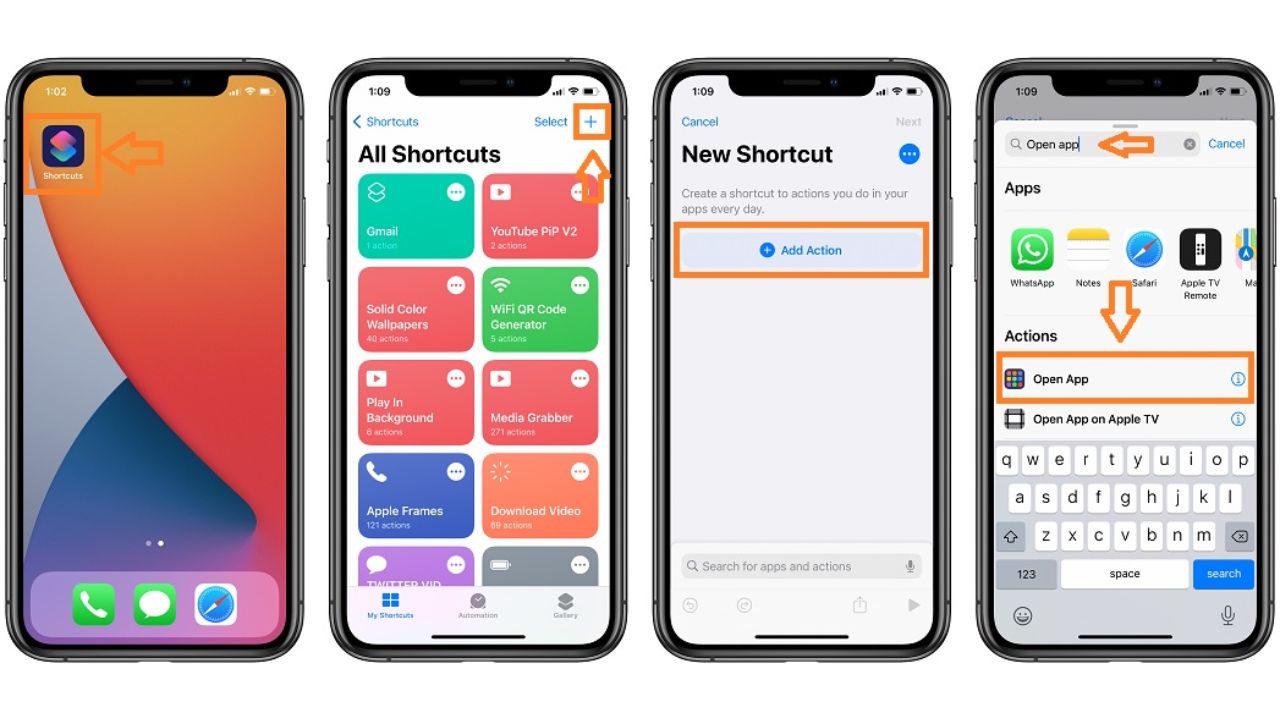
First, you need to open the Shortcuts app on your iPhone. This app is pre-installed, so you won’t need to download anything new.
- Open the Shortcuts app on your iPhone.
- Tap the “+” icon in the upper right corner to create a new shortcut.
- Tap on “Add Action”.
- In the search bar, type “Open App” and select it.
- Tap “Choose” and select the app you want to rename.
- Tap the three dots in the upper-right corner.
- Tap “Add to Home Screen”.
- Type in your preferred name for the app in the text box next to the icon.
- If you wish to change the app’s icon, tap on the icon and select “Choose Photo” to pick a new image.
- Tap “Add”, and then “Done”.
By following these steps, you should now have an additional icon on your home screen with the new name.
3. Common Questions About Renaming iPhone Apps
Can I Delete the Original App After Renaming It?
No, deleting the original app will also remove the renamed shortcut. The original app must remain installed on your device for the shortcut to function.
Why Does Shortcuts Open When I Tap the Renamed App?
When you tap the renamed app, it opens Shortcuts briefly before redirecting to the actual app. This is because the renamed icon is technically a shortcut to the app, not the app itself.
With the above guide, you now know how to rename apps on iPhone using the Shortcuts app. Though it may require a few steps, the personalization and organization benefits are worth it.





гидроизоляция подвала компания gidroizolyacziya-podvala-samara5.ru .
гидроизоляция подвала гарантия gidroizolyacziya-podvala-samara4.ru .
Замена кровли гаража или хозпостройки. Быстро, качественно замена крыши молодечно, по доступной цене. Используем остатки материалов с крупных объектов.
купить кухню купить кухню .
заказать кухню по индивидуальным размерам в спб заказать кухню по индивидуальным размерам в спб .
Любишь азарт? ап икс казино играть онлайн в популярные игры и режимы. Быстрый вход, удобная регистрация, стабильная работа платформы, понятный интерфейс и комфортные условия для игры в любое время на компьютере и мобильных устройствах.
sportwetten strategie ohne verlust
кухни спб на заказ кухни спб на заказ .
sportwetten reload bonus
Любишь азарт? up x официальный сайт играть онлайн легко и удобно. Быстрый доступ к аккаунту, понятная навигация, корректная работа на любых устройствах и комфортный формат для пользователей.
изготовление кухни на заказ в спб kuhni-spb-31.ru .
sportwetten vorhersage app
где заказать кухню в спб где заказать кухню в спб .
срочная помощь вывод из запоя краснодар vyvod-iz-zapoya-krasnodar-1.ru .
быстрый анонимный вывод из запоя на дому vyvod-iz-zapoya-krasnodar-2.ru .
вывод из запоя с выездом краснодар vyvod-iz-zapoya-krasnodar-1.ru .
вывод из запоя вывод из запоя .
mostbet вход в личный кабинет mostbet вход в личный кабинет
изготовление кухни на заказ в спб kuhni-spb-32.ru .
срочный выезд нарколога на дом narkolog-na-dom-krasnodar-1.ru .