
Are you curious about how to rename apps on iPhone? It’s a frequent question we hear, particularly from users who like to keep their home screen organized and personalized. While it might seem complicated at first, renaming apps on your iPhone is actually a straightforward process once you understand the steps. This article, Trendbbq.com will guide you through that process with the latest information available.
1. Why Renaming iPhone Apps is Useful?
Many iPhone users often wonder why they might need to learn how to rename apps on iPhone. Well, the answer lies in personalization and organization. Renaming apps allows you to label them according to your preference, which can significantly enhance your user experience.
Enhance Personalization
Renaming apps on your iPhone provides an added level of personalization. You can choose names that resonate more with your usage, making the apps feel more ‘yours’.
Improve Organization
By renaming your apps, you can group related apps together more intuitively, boosting your overall productivity and efficiency.
2. How to Rename Apps on iPhone
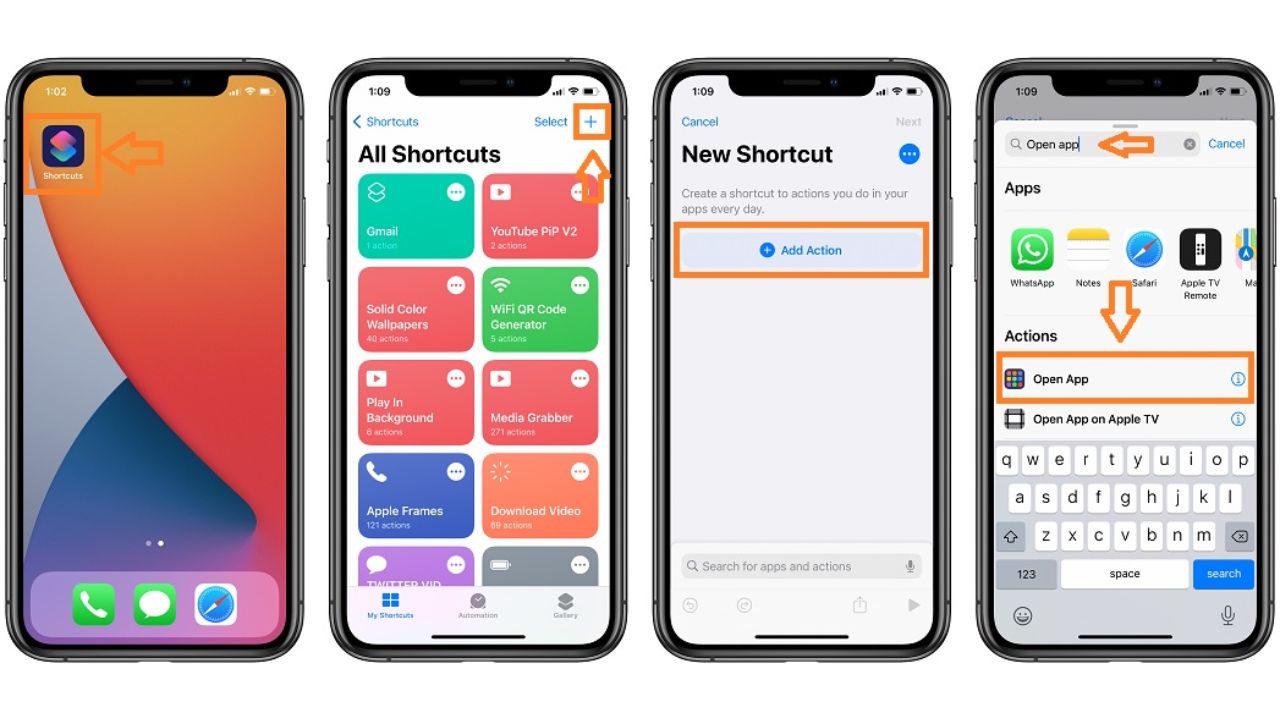
First, you need to open the Shortcuts app on your iPhone. This app is pre-installed, so you won’t need to download anything new.
- Open the Shortcuts app on your iPhone.
- Tap the “+” icon in the upper right corner to create a new shortcut.
- Tap on “Add Action”.
- In the search bar, type “Open App” and select it.
- Tap “Choose” and select the app you want to rename.
- Tap the three dots in the upper-right corner.
- Tap “Add to Home Screen”.
- Type in your preferred name for the app in the text box next to the icon.
- If you wish to change the app’s icon, tap on the icon and select “Choose Photo” to pick a new image.
- Tap “Add”, and then “Done”.
By following these steps, you should now have an additional icon on your home screen with the new name.
3. Common Questions About Renaming iPhone Apps
Can I Delete the Original App After Renaming It?
No, deleting the original app will also remove the renamed shortcut. The original app must remain installed on your device for the shortcut to function.
Why Does Shortcuts Open When I Tap the Renamed App?
When you tap the renamed app, it opens Shortcuts briefly before redirecting to the actual app. This is because the renamed icon is technically a shortcut to the app, not the app itself.
With the above guide, you now know how to rename apps on iPhone using the Shortcuts app. Though it may require a few steps, the personalization and organization benefits are worth it.





cash out 1win https://1win62509.help/
mostbet aviator 2026 mostbet aviator 2026
маркетинговые стратегии статьи seo-blog20.ru .
live wetten österreich
мостбет plinko 2026 мостбет plinko 2026
die besten sportwetten apps
mostbet http://mostbet34518.help/
beste sportwetten vorhersagen
online wetten sport
wettbüro cottbus
wettanbieter deutsche lizenz
из спб в калининград по воде vodnyye-progulki-v-spb.ru .
1win yeni hesab http://1win5764.help
pin-up pul yechish uchun hujjatlar pin-up pul yechish uchun hujjatlar
1win paynet http://1win5758.help/
mostbet apk z oficjalnej strony mostbet apk z oficjalnej strony
1win apk son versiya 1win apk son versiya
Hello! Quick question that’s completely off topic. Do you know how to make your site mobile friendly? My site looks weird when browsing from my apple iphone. I’m trying to find a template or plugin that might be able to correct this issue. If you have any recommendations, please share. Thanks!
1win free spins Uganda 1win free spins Uganda
набор суши акции спб набор суши акции спб .